
之前我电脑上的项目都是在 A Github账号下的,这几天准备新开一个 B 账号,挂一些别的项目。然后在使用的时候,就会报错,说没有github(B账号的权限)。
我个人对 Git 不熟,还是今年 Cursor 火了,才开始接触。这个问题我一直有,但是不知道怎么办。之前都是在 Github Desktop 上操作。这几天在用 Trae 的时候又遇到该问题,想着要解决掉,不然太费时间。
Gemini 告诉我最好用的解决办法是使用 SSH Key + SSH Config。(AI太好用,已经离不开了)。
解决方案:使用 SSH 多账号配置
通过这种方式,我就可以让不同的文件夹(仓库)自动指向不同的 GitHub 账号,无需反复登录登出。
为新账号生成独立的 SSH Key
1. 打开终端(Git Bash 或 PowerShell)。
2. 输入以下命令生成新 Key(请替换为新 Github 账号的邮箱):
ssh-keygen -t ed25519 -C "[email protected]"3. 关键点:当提示 Enter file in which to save the key 时,不要直接回车。输入一个新路径以防覆盖旧的,例如:
- macOS/Linux:
~/.ssh/id_ed25519_kerrynotes - Windows:
/c/Users/用户名/.ssh/id_ed25519_kerrynotes
以上步骤,在我直接跟 Trae 说了我的需求后,它自己帮我搞定了。
将 SSH Public Key 添加到 GitHub
- 打开
id_ed25519_kerrynotes.pub文件,复制里面的全部内容。 - 打开 SSH KEY 的设置页面,点击 New SSH key,把内容粘贴进去。
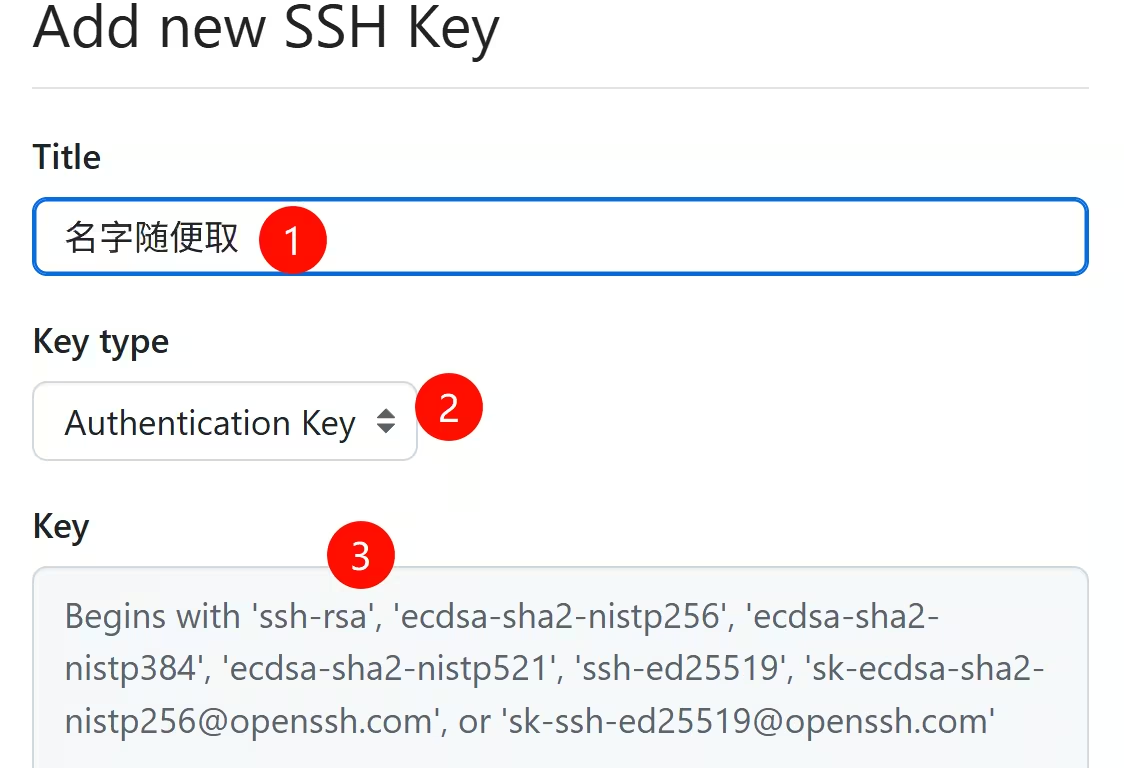
配置 SSH Config 文件
这一步 AI 可能会因为权限问题不能直接创建,需要我们自己动手。
请在 C:\Users\用户名\.ssh\ 目录下创建(或编辑)名为 config 的文件(注意没有后缀名),使用记事本或别的编辑器打开它,添加以下配置:
# Default GitHub (A)
Host github.com
    HostName github.com
    User git
    IdentityFile ~/.ssh/id_ed25519_A

# New GitHub Account (kerrynotes)
Host github-kerrynotes
    HostName github.com
    User git
    IdentityFile ~/.ssh/id_ed25519_kerrynotes
测试连接
配置完成后,我们在终端运行以下命令测试新账号是否连接成功:
ssh -T git@github-kerrynotes如果看到 Hi kerrynotes! You've successfully authenticated… 则说明配置成功。
如何使用
以后克隆 kerrynotes 账号下的仓库时,就用:
git clone git@github-kerrynotes:kerrynotes/repo-name.git对于已经存在的仓库,可以修改 remote url:
git remote set-url origin git@github-kerrynotes:kerrynotes/repo-name.git设置本地仓库的用户信息: 为了保证提交记录(Commit)显示的是 kerrynotes,在该仓库下执行:
git config user.name "kerrynotes"
git config user.email "[email protected]"